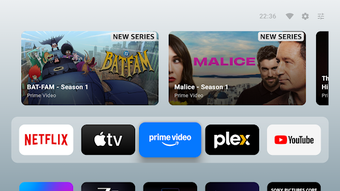
AT4K Launcher is a TV home screen replacementbuilt for users who want a cleaner, faster way to open apps and resume content. It reduces clutter with a minimal layout, a Favorites row, and a Watch Next section for ongoing shows. The launcher also supports custom wallpapers, light and dark themes, manual app reordering, and optional featured content cards.
The launcher replaces the stock-styleTV home screen with a simpler layout focused on direct access. A Favorites section keeps pinned apps easy to reach, while the Watch Next row helps users continue supported content with fewer remote clicks. Featured content cards can also be hidden, which keeps the interface cleaner for users who prefer fewer recommendations on-screen.
A little style, without the setup circus
AT4K Launcher includes practical visual controls such as custom wallpapers, light and dark themes, and manual app reordering. These options make the home screen feel more personal without burying users in complex menus. The customization is straightforward rather than deeply layered, so it suits users who want a tidy layout more than a full dashboard redesign.
Built light for smoother couch control
The launcher is designed to be lightweight, with remote-friendlynavigation and smooth movement across rows and apps. Its pared-down design can help older or lower-spec TV devices feel less bogged down than cluttered default interfaces. However, some content rows and Watch Next behavior still depend on device support and the apps installed on the system.
Simple setup, small adjustment curve
Daily use is built around remote control navigation, so pinning apps, reordering icons, and changing wallpapers stay easy to manage from the couch. Replacing or working around the default launcher can still require extra setup on some devices, and users who enjoy discovery widgets or heavy recommendation feeds can find the minimalist approach too restrained.
A cleaner screen for quieter streaming
AT4K Launcher is a strong option for users who want a faster, cleaner TV home screen with useful personalization and fewer distractions. Its ad-free, tracking-free approach is a major strength, especially beside busy default launchers. It is best for users who value speed, privacy, and simple control over those who want dense content discovery features.
Pros
Clean and lightweight TV home screen
Favorites and Watch Next rows support quick access
Custom wallpapers, themes, and app reordering
Ad-free and tracking-free experience
Cons
Watch Next behavior depends on device and app support
Laws concerning the use of this software vary from country to country. We do not encourage or condone the use of this program if it is in violation of these laws. Softonic may receive a referral fee if you click or buy any of the products featured here.